
THE ORIGINAL ATTITUDE01
2026SILICON-INSPIRED
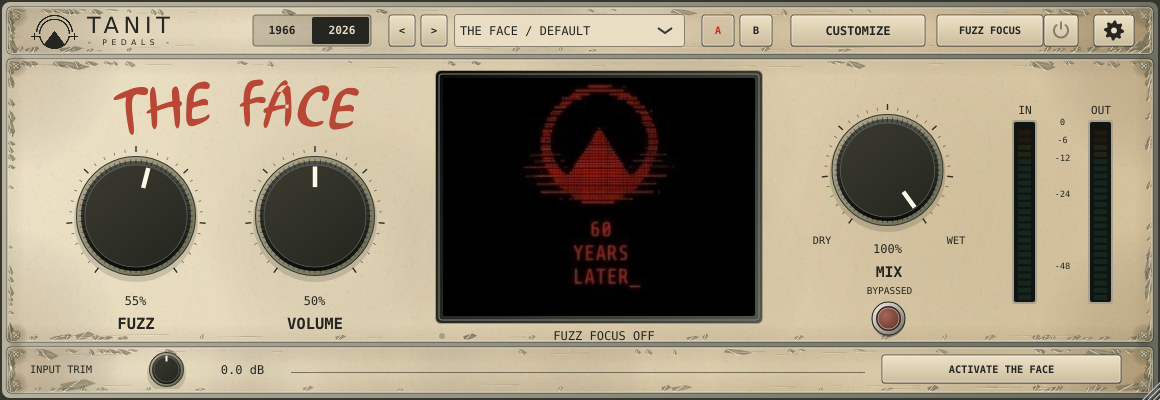
Forward, biting fuzz with the edge of the modern THE FACE circuit. From a rough growl to a full, saturated wall of sound.
Cream finish. A sharper personality.
THE FACE / AUDIO PLUGIN / BETA
THE FACE fuzz plugin brings its character inside your session.
Two eras of fuzz. Frequency-focused dirt.
Now with tempo-controlled sweeps and 34 presets.
01 / THE SOUND
Change the skin. Change the character.
Your controls and custom image stay right where you left them.
Forward, biting fuzz with the edge of the modern THE FACE circuit. From a rough growl to a full, saturated wall of sound.
Warmer, fuller and a little less distorted. A gentler voice inspired by the character of early NKT275 germanium fuzz.
EXCLUSIVELY IN THE 1966 VOICE
Turn Battery down from a fresh 9 V and lean into sag, shorter decay and gated, sputtering fuzz. Play softly. Dig in. Let the note break apart.
The 1966 voice and Battery are musical interpretations, not a measured replica of a particular vintage pedal.
02 / FUZZ FOCUS
Fuzz the lows. Keep the sparkle.
Or turn the mids into something unruly.
Choose the frequency range that enters the fuzz. The rest of the signal stays cleaner, while the live input/output analyzer shows what’s happening.
Open Fuzz Focus beside Customize. Its separate power button lets you enable or disable it from the main panel. Drag the band or set its edges, then decide how far the new harmonics can go.
Contained pulls the added distortion back toward your selected band.
Interactive band guide. The audio examples below use fixed settings.
Filter edges overlap smoothly. Contained reduces out-of-band harmonics; it does not create a brick-wall boundary.
OPTIONAL AUTO FILTER
Sweep the frequency range that feeds the fuzz. Follow your project’s groove, or set a tempo all your own. Switch Auto off whenever you want a fixed band.
Interface previews with updated Tanit Plugins branding. The analyzer moves with your signal in the plugin; these previews are still images.
03 / MAKE IT YOURS
Put your portrait, your artwork or your band’s identity inside the plugin. Give it a name. Pick a colour. Make it unmistakably yours.
Upload, zoom and drag it into place on the main screen.
Fuzz drives visual distortion. Volume adds red tint. Motion follows your playing.
Your image, name, framing and colour save with your session.
FOR ENGINEERS & PRODUCERS
Give each song or project a visual identity. A band logo, cover artwork, a portrait or a song name can become a familiar cue whenever you open THE FACE.
Choose a window. Give the session a familiar face.
Three windows into something coming soon.
01 / SESSION IDENTITY
Different windows. One story.
Find the meaning ↗ — discover Bulrush (opens in a new tab)Illustrative session previews with AI-generated photographic artwork. Switching changes the image and name. In the plugin, visual distortion reacts to your sound.
01 / RECOGNIZE THE SESSION
Choose an image that belongs to the music. Your image, name, framing and colour save with the session, so reopening the plugin brings back the identity you chose for that song or project.
02 / MAKE IT MOVE
Keep the artwork recognizable, then let it react to your playing. Fuzz drives the visual distortion, Volume adds red tint, and Motion brings the image to life.
03 / TAKE IT TO THE PEDAL
Customize and export your image locally inside the installed plugin—no online customizer needed. Export to Pedal creates a pedal-ready JPEG for your physical THE FACE, ready to transfer by USB.
The export is a still image prepared for the pedal’s portrait screen; live distortion and red tint are not baked into it.
04 / LISTEN CLOSELY
Same guitar riff. Different characters.
Switch sounds while it plays to hear the change.
Fuzz 55% · Volume 50% · Mix 100%
Rendered through the native plugin from the same clean guitar recording. No amp or cabinet simulation. Dying Battery uses its own preset settings and is not loudness-matched.
FACTORY PRESETS
From warm leads and sputtering batteries to focused bass grit and rhythmic sweeps. Start with a preset, then turn it into your sound.
26 presets for static sounds, plus 8 with Auto Filter enabled. Both voices included.
FROM FIRST CLICK TO FIRST RIFF
Selected beta testers receive installation and activation instructions with their compatible build. Insert THE FACE on an audio track in a supported DAW.
Start with one of 34 presets, or choose 1966 or 2026 and dial in Fuzz and Volume. Blend back the clean signal with Dry/Wet Mix.
Add your image, focus the fuzz and give it movement with Auto Filter. Set your own tempo or sync to the project, then compare ideas with A/B.
THE FACE / PRIVATE BETA
Help shape THE FACE in real sessions.
Two voices. Fuzz Focus. Optional Auto Filter.
34 presets and a face that reacts to your playing.
STANDALONE PLUGIN / AFTER BETA
€39for the first 30 days from public release
Then €59 regular price. One permanent licence for one device.
The 30-day offer begins when the plugin launches, not during beta. Release date to be announced. Public purchases and downloads are not open yet.
Included pedal licences and approved beta participants’ complimentary licences remain free.
Applications are open. Participants are selected according to testing needs and compatible builds. Applying does not guarantee acceptance or immediate access.
macOS and Windows testing waves are being prepared. Supported operating systems, DAWs and plugin formats will be confirmed with each beta build. Public release date and final system requirements are still to be announced.
HELP SHAPE THE RELEASE
Selected testers receive a permanent complimentary licence for one device.
No fee · selected testers only · access when ready
Applying does not unlock a download. Selected testers receive a separate invitation, build access and activation instructions when their compatible build is ready. No access date is guaranteed.
Read the beta program detailsA FEW GOOD QUESTIONS
This is the software audio plugin, inspired by THE FACE pedal. It is being developed for compatible DAWs and standalone use. Availability depends on the beta build. Hardware is not included.
Audio Unit (AU) support for Logic Pro is planned. macOS release testing is still in progress. We will confirm supported versions, requirements and available formats with each beta build before providing access.
The interface changes from cream to aged silver, with vintage knobs and a green light when the pedal is engaged. The sound becomes warmer, fuller and a little less distorted, and the 1966-only Battery control appears. Your main controls and custom image stay in place.
Yes. Fuzz Focus selects the frequency range entering the fuzz. Open lets new harmonics extend beyond it; Contained reduces that spill. Filter transitions are gradual, so nearby frequencies overlap.
The pedal still produces full-range fuzz. The spectrum keeps moving in grey, and Auto Filter no longer affects the sound. Opening or closing the drawer does not change the Focus power setting.
No. With Project Sync on, it follows your DAW tempo and transport. Switch Sync off to enter your own tempo from 30 to 300 BPM. The note-rate selector works in both modes, and your manual BPM is remembered. Auto Filter also has its own on/off control for returning to a fixed band.
34 factory presets cover both voices, battery-starved textures and focused frequency ranges. Eight of them use Auto Filter for rhythmic sweeps. You can adjust any preset and save your settings with your session.
The licence is for one device. Activation, transfer and recovery instructions will be confirmed with your build; licence delivery is still being finalized.
Activation and offline-use requirements are still being finalized. Beta participants will receive the requirements for their build before installation; final release requirements will be published before sales open.
Yes. Image customization and pedal-image export run locally inside the installed plugin, without using the online customizer. Export to Pedal saves a still JPEG prepared for the physical THE FACE screen, which you can transfer by USB following the pedal’s image-loading instructions. Live distortion and red tint remain in the plugin. Licence activation and renewal have separate connection requirements.
Apply for the private beta. Participants are selected based on testing needs and compatible builds. Applying is not acceptance or an immediate download. Approved testers receive build access and activation instructions separately. Read the program details for the testing and sharing commitments.
No. Each THE FACE pedal purchase includes one permanent plugin licence for one device at no extra cost, delivered by email when the release version is ready. Approved beta participants retain their permanent complimentary licence under the beta program. The €39 introductory price and €59 regular price apply only to standalone plugin purchases.
Standalone sales open after beta testing, when the release version is ready: €39 for the first 30 days from public release, then €59 regular price. This is a permanent licence for one device. The release date and final compatibility are still to be announced. Public purchases and downloads are not open yet.
FROM MUSICIAN TO MUSICIAN
Questions about THE FACE, the beta or your studio setup? Write to Johnny at Tanit Plugins.
EMAIL JOHNNY ↗hello@tanitplugins.comOpens your email app. For technical questions, include your operating system, DAW and plugin version.